Tag: Blu-Ray

Buyer’s Guide–Component Network Media Adaptors

Introduction
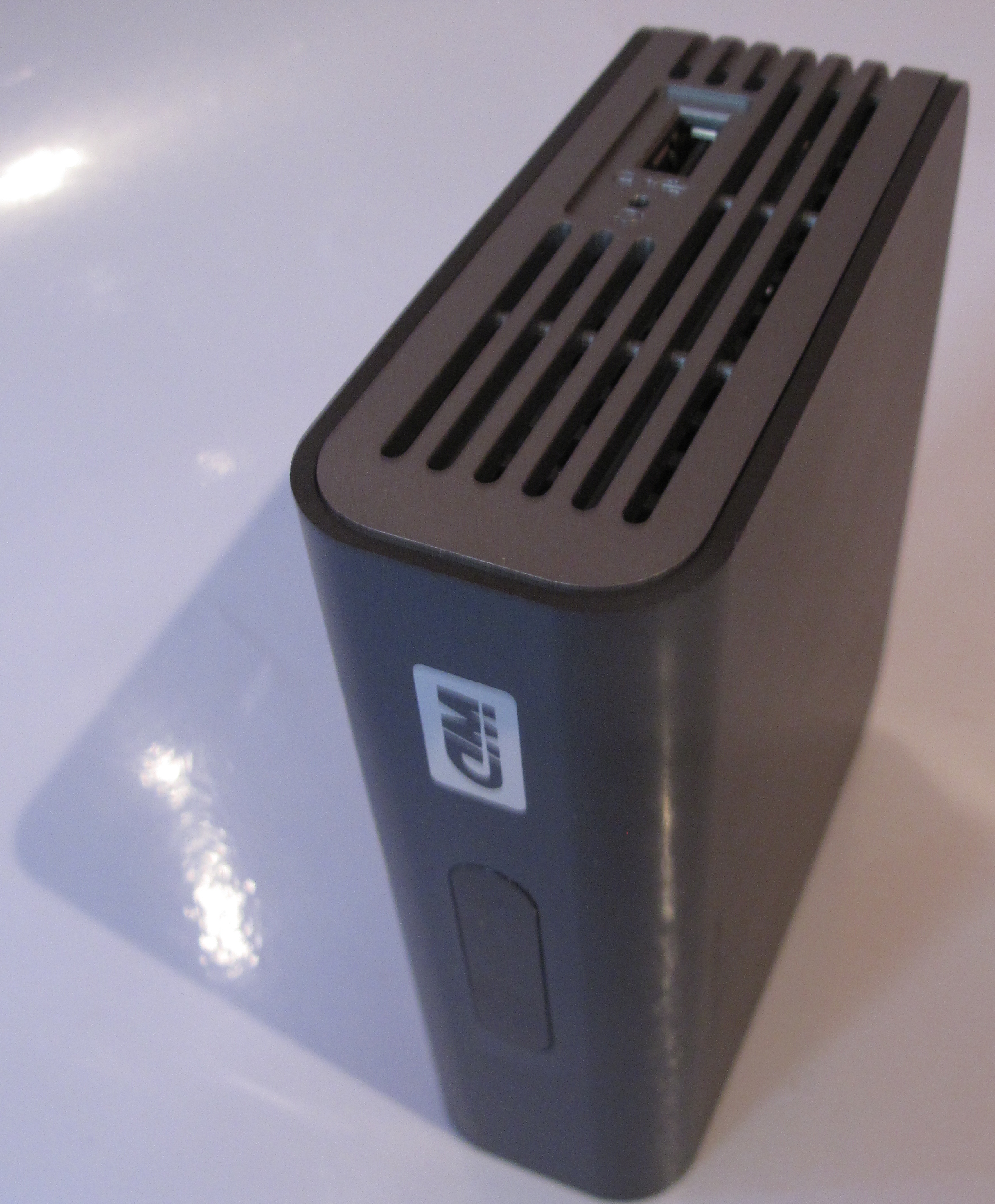
Western Digital WDTV Live network media adaptor

Western Digital WDTV Live network media adaptor

There was a trickle of component network media adaptors which provide media playback from the Internet or home network to an existing audio-video system but this trickle has now become a flood over the past few years with equipment being offered at varying functionality and cost points.

For video content, most of these devices including some of the current-model Blu-Ray players may offer “over-the-top” TV services to existing TV equipment and this may avoid the need to buy a “smart TV” for this kind of content. This would appeal to those of us who would rather spend money on equipping our home theatres with a video projector or top-notch high-performing LCD TV rather than buying a “smart TV” to keep up with the Joneses. Similarly, these devices can expose a secondary TV like the one located in the secondary lounge area or master bedroom to the plethora of online content.

Similarly, you may want to invest in an audio-based network media player so you can enjoy Internet radio or music held on the network-attached storage through the hi-fi system. This is becoming more so as high-grade audio files of classic and contemporary albums are being made available for sale and file-based audio content has now achieved hi-fi credentials.

What are these devices

A component network media adaptor like the Western Digital WDTV Live is designed to connect to existing audio and video equipment and show network-derived content on such equipment. Of course, they will work as a gateway to some Internet-hosted media services like IPTV / video-on-demand or Internet-radio services; and a few may work as a terminal for popular interactive Internet services like the Social Web.

If the manufacturer keeps investing in the device’s platform, there may be the ability for newer content services to be added to an existing device. This typically is being achieved through a continual firmware update or an app store that works in a similar vein to a mobile platform’s app store.
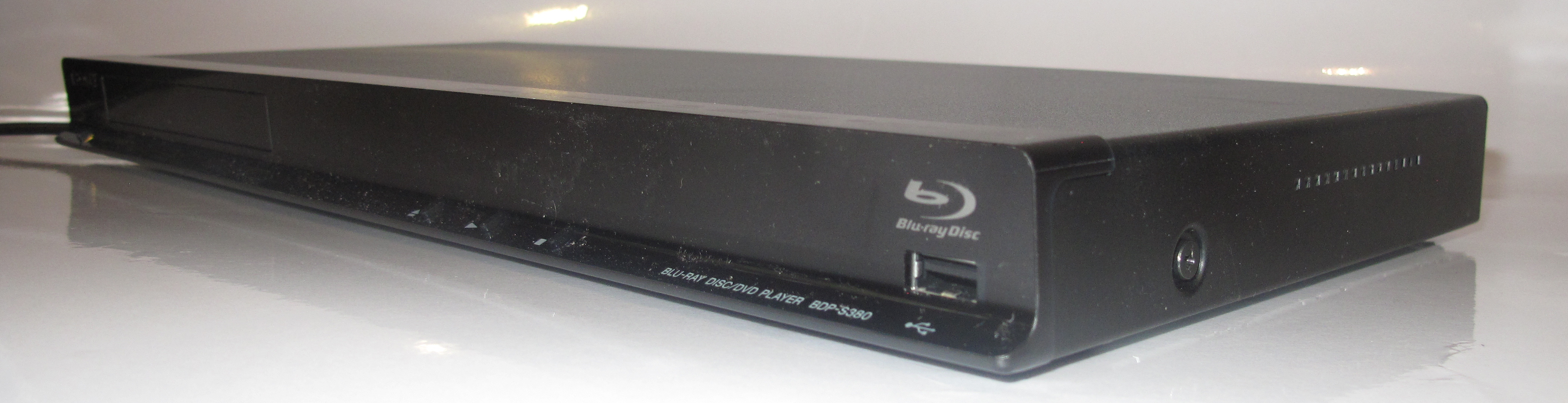
 

Sony BDP-S380 Network-enabled Blu-Ray player

Sony BDP-S380 Network-enabled Blu-Ray player

Some of these adaptor devices also have functionality for access to legacy media like a radio or TV broadcast tuner and/or an optical disk player. An example of this is the Sony BDP-S380 Blu-Ray player which I had reviewed. But these devices also have a USB port, iPod dock and / or memory card slot so that content held on any of these locations can be played through the device. Similarly, the Microsoft XBox 360 and the Sony PS3 games consoles are able to serve as component network media adaptors as well as satisfying marathon TV games sessions.

A selection of these devices have an integrated hard disk and are able to work also as a media server. Some of them may allow you to add the media files by “ripping” from supported optical discs or recording broadcast material from an integrated tuner as well as accepting the content from the network or USB memory keys in a similar vein to the typical network-attached storage device.

Two main classes

NAD C446 Media Tuner

NAD c446 Network Media Tuner

There are two main classes of these component devices and the class they fall in to is based on the content they are designed to reproduce.

Video-optimised

A video-optimised network media adaptor is designed primarily to reproduce video or still-image content on an attached TV or projector.

Key identifiers for this class of device include the presence of video connectors for a display device. These are typically HDMI, component or composite sockets alongside the audio sockets.

Another identifier is that there is a very small display on the unit itself which only shows content running time, or no display at all. The user is expected to operate the device using the remote control and looking at the attached video display device for visual feedback. This is common with very-low-end DVD players that don’t have a track/time display and I once saw one of these players in operation at a party and the hosts had the TV on so they know which tracks to play on a CD.

Of course, if they have a legacy media source, it will typically be something like a DVD/ Blu-Ray player or a digital-TV tuner. The online services available to this device would typically be the IPTV / video-on-demand / advanced-TV services and it may also work as a terminal for video-conferencing (with an add-on camera), interactive TV or the Social Web.

Audio-optimised

Linn Majik DS network preamplifier

Linn Majik DS network preamplifier

An audio-optimised network media device is designed primarily to reproduce audio content, especially music.

These devices have no video connections at all or they may use any such connections for a secondary purpose. It is augmented by the device having a display and controls on its front panel for selecting and playing content or a remote control with an LCD or OLED screen as its primary control surface. This means that the device won’t be dependent on the use of an external video display for its operation.

If the device supports legacy content, the will use either a radio broadcast tuner and / or a CD / SACD player. They will also have access to audio-based Internet content sources like one of the Internet-radio directories like vTuner, Pandora or Last.FM.

What to look for

Ethernet connectivity

A component network media adaptor should have an Ethernet connection in order to provide for reliable playback of high-quality network and online content via Ethernet or HomePlug AV. You may get away with Wi-Fi wireless for Internet radio, CD-quality audio content, still images or standard-definition video content.

UPnP AV / DLNA

As well, the device should support UPnP AV / DLNA functionality. The basic level of support for this functionality is to find and play media held on DLNA media servers using the device’s control surface. On the other hand, a better-equipped device is able to play content that you push to it from another UPnP AV / DLNA control point like a lot of smartphone media-control software such as TwonkyMobile.

It also allows your device to be future-proof and is of importance whenever you look towards running specialist media-server equipment such as network PVRs on your home network.

Internet-media services

Most low-end video-optimised equipment will support fewer Internet-video services but the mainstream-priced equipment from the big brands will offer access to the popular TV services in your territory like the catch-up-TV services and the big-time video-on-demand services like Netflix.

If a device has access to online interactive services like Facebook or Picasa, only one person will be able to operate their online service on the device at a time. This functionality may just be useful for showing pictures held on the user’s online-service account but activities like updating the status comment on the service or simply logging in may be very difficult. This is due to the limited user interface that these devices offer as I have previously talked about.

Devices complementing each other

Some of these network-media adaptor devices can complement each other. For example, you may use a newer adaptor that provides access to newer content services while you have an older adaptor that the manufacturers have given up on still able to provide some of the online and network-sourced media that you are after.

Similarly, you could use an audio-optimised network media adaptor for playing radio and music sources while you have an Internet-enabled TV or video-optimised network media player coming in handy for image and video content.

Conclusion

The component network-media adaptor, whether in the form of a Blu-Ray player, set-top box or network-enabled tuner, can expose existing audio-video equipment to the world of online or network-hosted entertainment content.

Freebox Révolution–the standard to measure a triple-play service by

Articles (French language – best resources)

Dossier -Test du Freebox Server | DegroupNews

Freebox Revolution – Test du Freebox Player | DegroupNews

From the horse’s mouth

Freebox Home Page – Free (France – French language)

My comments

Typically, the kind of equipment supplied to consumers by telecommunications carriers and Internet service providers for “triple-play”or similar Internet services has typically been drab in design and functionality. This is typically to work to the lowest-common denominator with both price, functionality and style.

The situation is very different in France where there is a lively competitive market for “triple-play”Internet service. Most urban or regional centres in this country are “dégroupée” for multiple competing ADSL-service operators. Here, these operators have access to the customers’ telephone lines as cable without paying France Télécom for a dial-tone service. There is also a steady rollout of fibre-optic service by the competing service providers for next-generation broadband Internet, with an overlaying requirement to provide competitive access to the ducts and poles for the fibre-optic service.

One of these major players is Free who have established a triple-play service for many years. Their latest iteration of the “Freebox” is now a benchmark for anyone offering a similar setup, whether in France or anywhere else.

I have previously covered the Freebox Révolution  in HomeNetworking01.info when a recent firmware update was released that integrated it with Apple’s ecosystem. As well, I have researched many French and English-language resources to learn more about this system.

The Freebox Révolution system

This system, like other triple-play setups offered in France, comprises of an Internet-gateway device, known as a “box”, and a set-top-box, known as a “décodeur”. These units have typically been interlinked by an Ethernet cable or user-supplied HomePlug kit, but is connected through a pair of “Freeplugs” which combine a power supply and a HomePlug-AV-Ethernet bridge in one box.

The units are a statement of industrial design in a similar way that Bang & Olufsen equipment are still a statement in this regard for consumer audio-video equipment. Both the Internet-gateway device and the set-top box have been designed by Phillippe Starck, known for extraordinary designs like the Parrot Zikmu network-enabled speakers or some of the LaCie external hard drives or network-attached storage systems.

Internet Gateway Device (Freebox Server)

This device consists of a broadband router, network-attached storage, VoIP ATA with DECT base station and audio player in one box.

It has a dual-WAN interface for either an ADSL2 service or an FTTH fibre-optic service. But the LAN functionality is one of the hallmarks of a cutting-edge device. It has 4 Gigabit Ethernet switched ports for Ethernet client devices as well as an access point for an 802,11n three-stream 450Mbps Wi-Fi segment. I mentioned previously that this unit also supports a HomePlug AV segment through the use of the supplied Freeplug adaptors. The Wi-Fi access point can also work as a separate “hotspot segment” for other Free subscribers.

The VoIP functionality works with an integrated analog-telephony adaptor and a DECT base station that you can associate 8 DECT cordless handsets with. These will provide full functionality with CAT-iQ DECT handsets.

The 250Gb NAS can work with the regular file-protocol suspects (CIFS, FTP, HTTP) but can work as a DLNA media server. It also works as a “staging post” for FTP, HTTP and BitTorrent downloads, the latter function being described as a “seedbox”. The recent firmware upgrades also implemented Apple TimeMachine support for incremental MacOS data backups. Of course, there is USB connectivity for 2 devices as well as eSATA connectivity for an external hard disk.

There are integrated speakers for playing media held on the hard disk, the Internet or an Apple AirPlay network but you can use it as an elementary amplified-speakers setup by connecting a Discman or iPod to its AUDIO IN jack. Of course you can play the music through better powered speakers or an amplifier using the AUDIO OUT jack.

This router is totally UPnP to the hilt with UPnP Internet-Gateway-Device for hands-free setup with Skype, games, MSN Messenger and the like; as well as being a UPnP AV / DLNA media server. Free could do better by integrating something like TwonkyMedia which can allow content discovery on metadata other than the file-system tree.

Let’s not forget that the Freebox Server is IPv6-ready as expected for a future-proof device. This is being augmented by the fact that ADSL Free subscribers in zone dégroupée aras or FTTH Free subscribers can have an IPv6 connection now.

Set-Top Box (Freebox Player)

This unit has an integrated Blu-Ray player with Blu-Ray 3D support (after new firmware added) as well as a digital-TV / IPTV set-top box / PVR. It connects to the TV via an HDMI connector or a SCART cable, both offering that “single-pipe” connectivity between the Freebox and the TV. Of course, there are connectivity options for other audio-video setups like SPDIF optical; and you can connect USB peripherals like SD card readers to this unit for direct viewing.

It is controlled via a gyroscopic remote control but has a supplied game controller as an alternate input device. Of course, you can connect a USB keyboard and mouse to it as extra input devices or control it from your iPad using the Freebox Connect app.

One drawcard in my opinion is that it is a fully-fledged Internet terminal with access to an app store, namely the FreeStore app store. This allows you to download games and similar “lean-back” apps; as well as view the Web or check email from your couch. Just of late, this set-top box has had YouTube support baked in to its latest firmware update.

You can now use the Freebox Player and its associated sound system or television’s speaker to play material from your iTunes software or iOS device using AirPlay. This at the moment applies to audio content only.As well, you can discover and play content held on DLNA-compliant media servers on your network including the Freebox Server’s hard disk.

Plans and Pricing

You can equip that French home or apartment with this device for € 29.90 per month. This gives you inclusive unlimited telephone telephone calls to standard phone services in most countries (Europe, Francophone countries, US, Australia, NZ, etc); and mobiles in France.

The Internet service would be up to 28Mbps while you have access to most basic TV service. Pay €1.99/month extra for 185 additional TV channels while you can service another room with Free’s TV service for €4.99/month extra with a simple set-top box or another of this Freebox Player for €9.99/month extra.

Existing Free subscribers can upgrade for €199.99 less €30 for each year they have been with Free.

The prices are obtained from Free’s latest tariff charts available on their site and would appear to be ridiculously low for people who live in a country that doesn’t have a lively competitive broadband-Internet market.

Conclusion

What I see of the Freebox Révolution is a system of equipment for a home network that is all about an Internet service provider offering a future-proof attractive cutting-edge piece of equipment rather than offering second-rate equipment to their customers.

This is primarily driven by a country who is behind a really competitive Internet service market for consumers and that the competition is driven on value rather than the cheapest price possible.

Product Review–Toshiba Satellite P750 multimedia laptop computer (Part No: PSAY3A-05F001)

Introduction

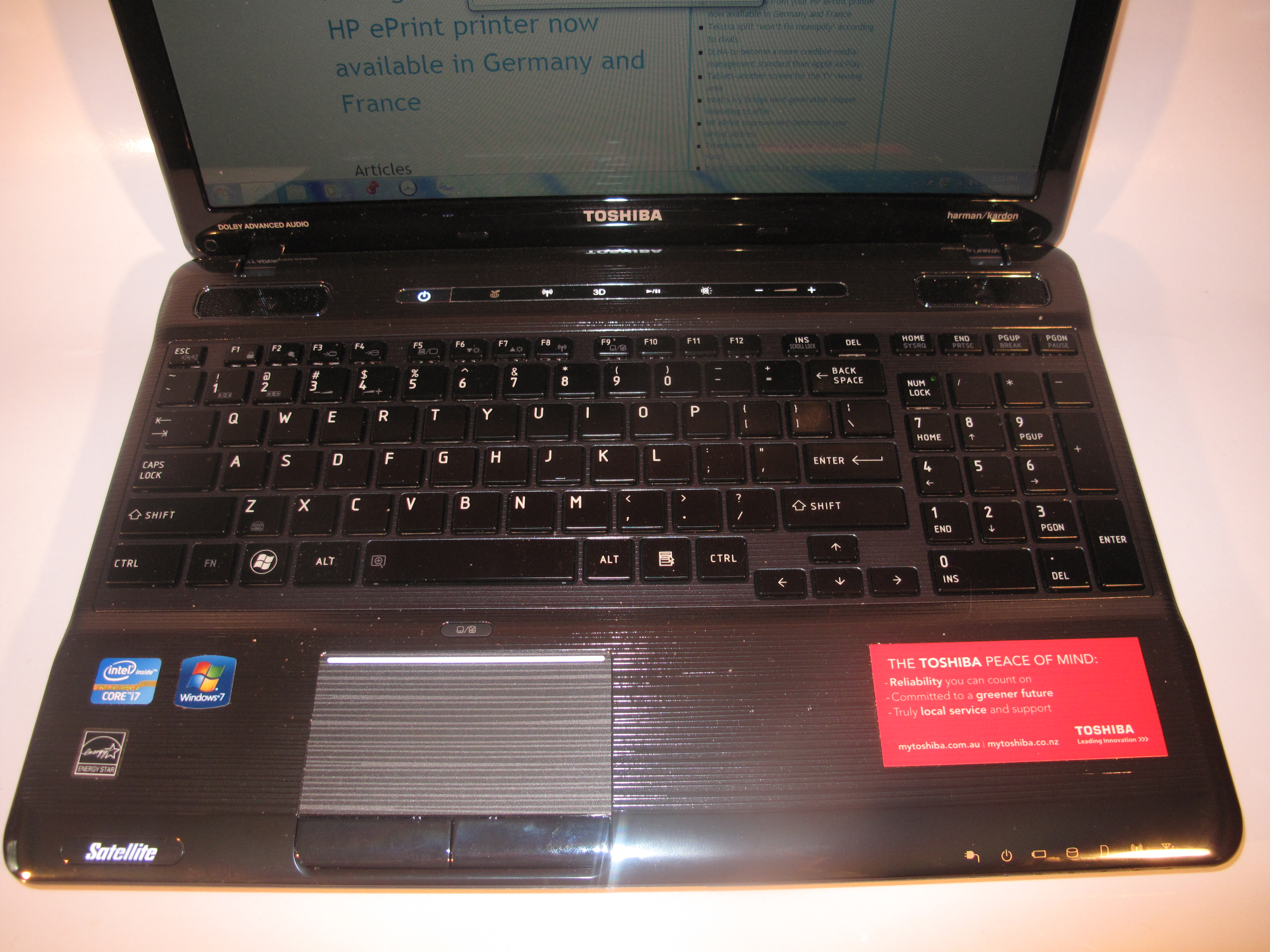
I am reviewing the Toshiba Satellite P750 multimedia laptop which is Toshiba’s effort at a work-entertainment multimedia centre that would suit current needs. It is a 15” equivalent of the Satellite P770 which is on a par with the Dell XPS L702x multimedia laptop. It is also infact the first Sandy-Bridge-driven laptop of this mainstream size to have the full “multimedia” works to become available for review on this site.

Toshiba Satellite P750 multimedia laptop

Price
– this configuration
AUD$1799
Processor Intel Sandy Bridge i7-2630M Cheaper options – all Intel Sandy Bridge
i5-2410M
RAM 8Gb
cheaper options:
4Gb or 6Gb
shared with graphics
Secondary Storage 750Gb hard disk Blu-Ray burner, SD card reader.
cheaper option – DVD burner
Display Subsystem NVIDIA GeForce GT540M with 3D Vision (1Gb display RAM) Alternate option:
NVIDIA GeForce GT540M with Optimus dual-chipset (2Gb display memory)
Screen 17” 3D widescreen (1366×768)
cheaper option
17” widescreen (1366×768)
LED-backlit LCD
Network Wi-Fi
Ethernet Gigabit Ethernet
Connectors USB 3 x USB 2.0
Video External display
Audio External audio
Operating System on supplied unit Microsoft Windows 7 Home Edition
Windows Experience Index
– this configuration
Overall: 5.9 Graphics: 6.6
Advanced Graphics: 6.6

The computer itself

Aesthetics and Build quality

The Toshiba Satellite P750 is finished in what Toshiba describes as a “metallic urban” finish. This is a dark charcoal black finish with a finished-metal texture on a plastic case. It is the same across the lid and the palmrest.

The build quality is very good for its class I would expect a lot of time of use out of this series of machines.

User interface

Toshiba Satellite P750 multimedia laptop keyboard detail

Keyboard and trackpad detail

The Toshiba is equipped with an illuminated chiclet keyboard with numeric keypad. Unlike a lot of illuminated keyboards, this only lights up when you actually use the keyboard, the same practice as observed with a lot of mobile phones. Like for most recent-issue 15” and 17” laptops, there is a proper numeric keypad. The keyboard is still roomy to use and allows you to touch-type accurately for longer periods, although it feels very slippery.

It uses a trackpad is just slightly recessed and is highlighted by an illuminated bar at the top of the trackpad area. This can still be very sensitive and cause the cursor to jump around.

The Satellite P750’s keyboard and trackpad is augmented by a Supplementary touch buttons row above the keyboard. This provides control over wireless, 3D, media play-pause, sound volume and display brightness.

Connectivity and Expandability

Toshiba Satellite P750 multimedia laptop - right hand side with Blu-Ray burner

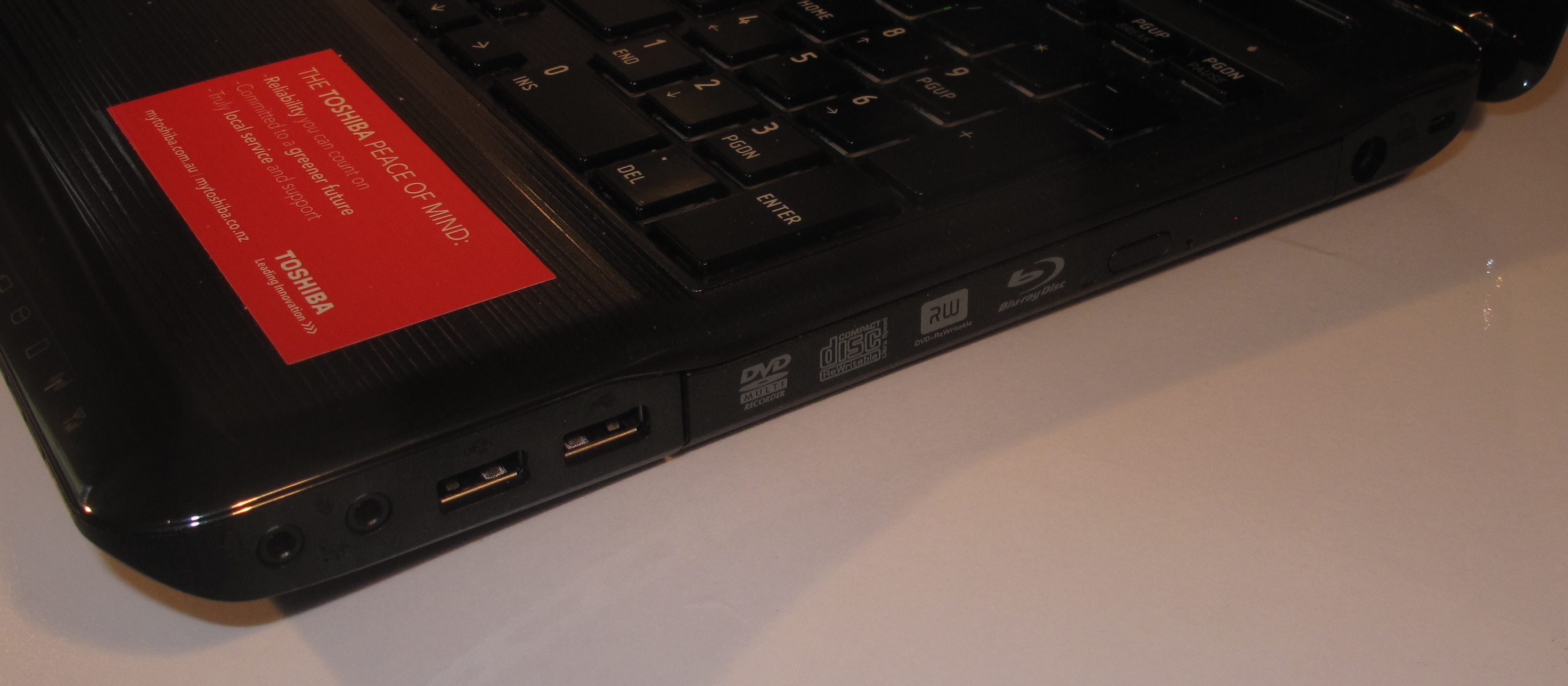
Right-hand side with Blu-Ray burner, 2 x USB 2.0 sockets, audio input and output and power socket

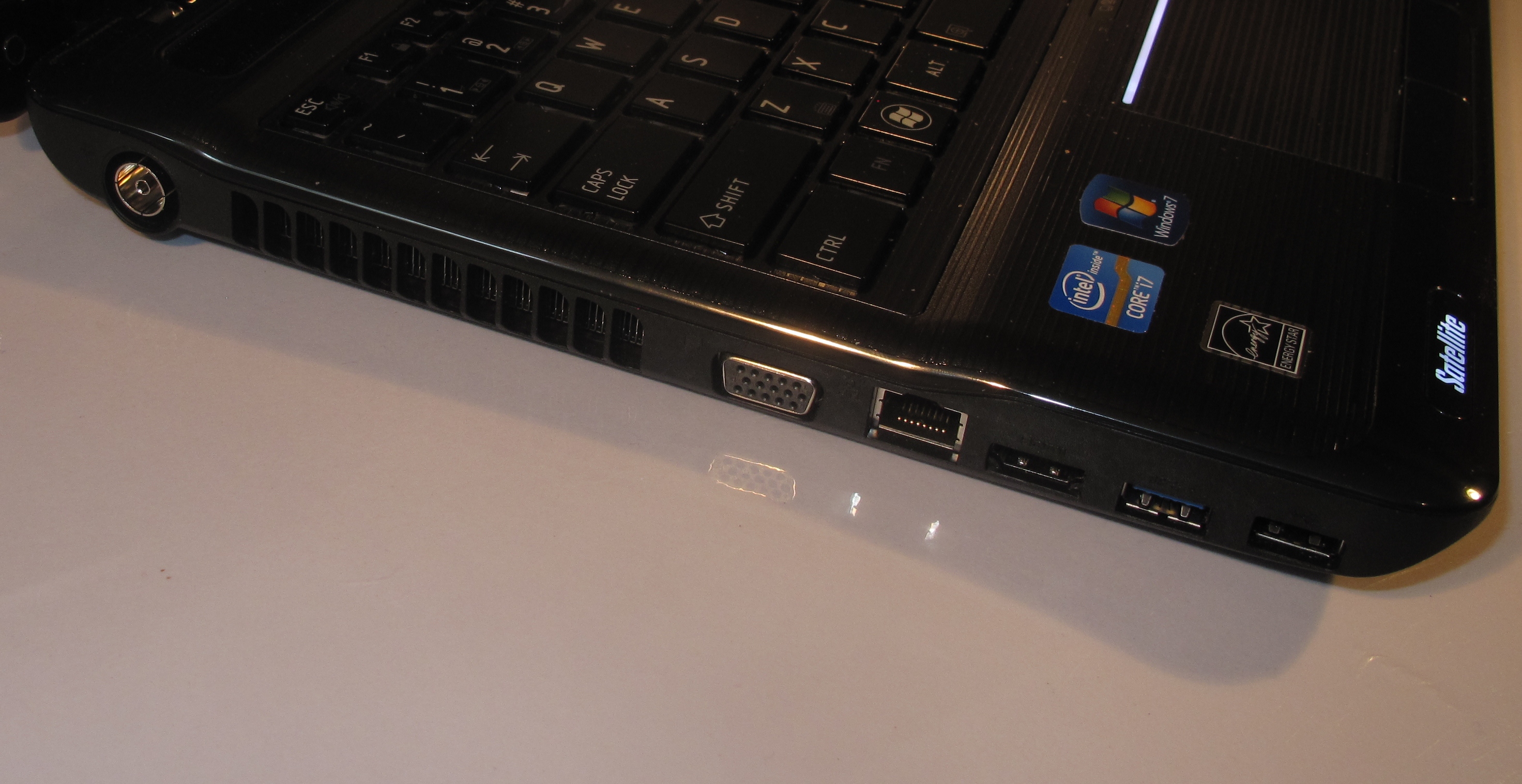
The Satellite P750 laptop has three USB sockets, with one being a USB 3.0 connector for hard disks and similar applications. Unlike most other laptops I have reviewed, it doesn’t have an eSATA connection but this won’t matter if the external hard disk has a USB 3.0 connector.

The Toshiba has the same “Sleep and Charge” as the previously-reviewed Portege R830 from the same stable. This is where it can use the USB 3.0 port to supply power to external devices while it is off; and can allow you to leave the mobile phone charger behind yet charge your mobile phone.

There are two 3.5mm jacks for connecting a microphone or line-level audio device; and a pair of headphones or external speakers. This Toshiba laptop can be set to become amplified speakers for a connected external audio player even if it is off through the “Sleep And Music” mode.

External displays can be connected to the Satellite P750 using the HDMI or VGA connectors, with the HDMI connector also supporting control of HDMI-CEC compliant displays and audio setups. For example, this would cause a connected Panasonic Viera plasma TV to light up with the computer’s display image when you turn this laptop on or a home-theatre receiver like the previously-reviewed Sony STR-DA5500ES to select the right input when the laptop comes on.

Toshiba Satellite P750 multimedia laptop - left-hand-side

Left hand side connections - Gigabit Ethernet, HDMI, VGA, USB 3.0 with Sleep and Charge, USB 2.0 and TV antenna

The TV antenna connection is the standard Belling-Lee (PAL) connector that is part of the machine’s connection set. This avoids the need to mess with cord adaptors in order to connect regular TV-aerial setups for the TV tuner. Of course, ATSC (USA) variants would use the screw-on F connector.

Audio and Video

The Toshiba Satellite P750 uses a 2.1 speaker system that has been “worked” by Harman-Kardon. The main benefits that I have heard include a very “punchy” sound for all kinds of media playback.

I have tested this Toshiba’s 3D Vision capabilities on the demonstration material that is made available by NVIDIA and it is effective. The NVIDIA 3D glasses worked properly on their own battery and did provide the proper effect. They were able to be used by people who wear prescription or other glasses by just simply wearing them over those glasses. You should really have the laptop connected to AC power if you want to use 3D capabilities because this can drain the battery very fast.

There are variants in the Toshiba Satellite P750 Series which have the Optimus version of the NVIDIA GeForce GT540M. These only support 3D when connected to a 3D-capable display like the newer 3D flat-panel “main-lounge-area” TVs. But they have the the Optimus automatic dual-graphics modes that allow you to conserve battery runtime.

The screen front is very glossy which can be of nuisance value in brightly-lit rooms and can attract fingermarks.

The Satellite P750 is equipped with an integrated digital-TV tuner which would be configured for the market that this laptop is supplied in. Personally, I would prefer that the tuner is software-based so that it can be set by the user to work in any country that the laptop is taken to.

Battery life

The main disadavantage of using only a discrete graphics chipset is that you lose on the battery runtime. I was able to engage in mixed tasks (typing, multimedia) for around three hours before it run down. Even running a DVD would make through two and a half hours. Use of the 3D functionality also places more demand on the battery.

It may be not of concern if you often run the machine from AC power rather than the batteries.

Limitations and Points Of Improvement

The Toshiba Satellite P750’s trackpad could be recessed further so it isn’t easily activated during a bout of touch-typing.

The lock slot could also be repositioned so you can use larger locking devices while the laptop is connected to external power. This may be of concern with some of the combination locks that may have their release button close to the power cable.

I would also like to see the Blu-Ray drive be a direct-insert (slot-load) type rather than the typical drawer-load which becomes a bit too ordinary, especially on a premium-tier multimedia machine.

As I have said before, the TV tuner could be software-based for round-the-world TV reception; and the software-based operation could also support newer standards like DVB-T2 which is being rolled out across Europe.

Conclusion

I would position the Toshiba Sattelite P750 Series laptops as multimedia work-entertainment systems for nomadic users such as those of us who sail or fly for work. The combination of the Blu-Ray player, TV tuner and self-protecting hard disk would be of benefit to university students, nurses and the like who primarily live in on-campus accommodation that has small rooms like the typical college dorm. It also has the graphics ability that would expose it to image or video creation tasks.

Of course, if you were to take the screen size and the self-protecting hard disk out of the equation, this computer would be on a par with the Dell XPS L702x that I previously reviewed.

Product Review–Sony BDP-S380 Internet Blu-Ray Player

Introduction

I have written a previous article about recent Blu-Ray players with Internet-video functionality and how they can bless a TV with many years in its life with this “smart-TV” or “Internet-video” functionality.

Now I am reviewing the Sony BDP-S380 Internet-enabled Blu-Ray player which is an example of these players and is the entry-level model in Sony’s component Blu-Ray player lineup. This unit interests me because it is an example of a Blu-Ray player that can extend the functionality of existing TV sets, including older and cheaper units, by providing access to Internet TV services.

The BDP-S480, which is the next model up in the series and costs AUD$30 extra, has the functionality of this player but can show 3D-capable Blu-Ray discs on 3D-capable displays, as well as drawing down material held on the DLNA Home Media Network. The BDP-S580 also has integrated Wi-Fi functionality for most home and small-business Wi-Fi networks.

Sony BDP-S380 Network-enabled Blu-Ray player

Price

Recommended Retail Price: AUD$199

Sony BDP-S480 Recommended Retail Price: AUD$229

Functions

Internet Radio NPR Radio
Internet TV YouTube, LiveStrong, Wired, Market-specific catch-up TV services
Optical Disk Blu-Ray / DVD / SACD / CD
Stored Memory USB Mass-Storage Device

Connections

Output
Audio Line output 2 x RCA stereo
Digital Audio output SPDIF PCM / Bitstream via RCA coaxial
PCM / Bitstream via HDMI
Video Line output 1 x RCA composite,
Component Video Line Output 3xRCA jacks (YCC or RGB)
Video HDMI output 1 x HDMI
Network
Wi-Fi 802.11n WPA2 WPS with optional Sony dongle
Ethernet Yes

The unit itself

The Sony BDP-S380 is a slimline Blu-Ray Disc player that can work well as a DVD player or basic gateway to video-on-demand services.

Equipment setup

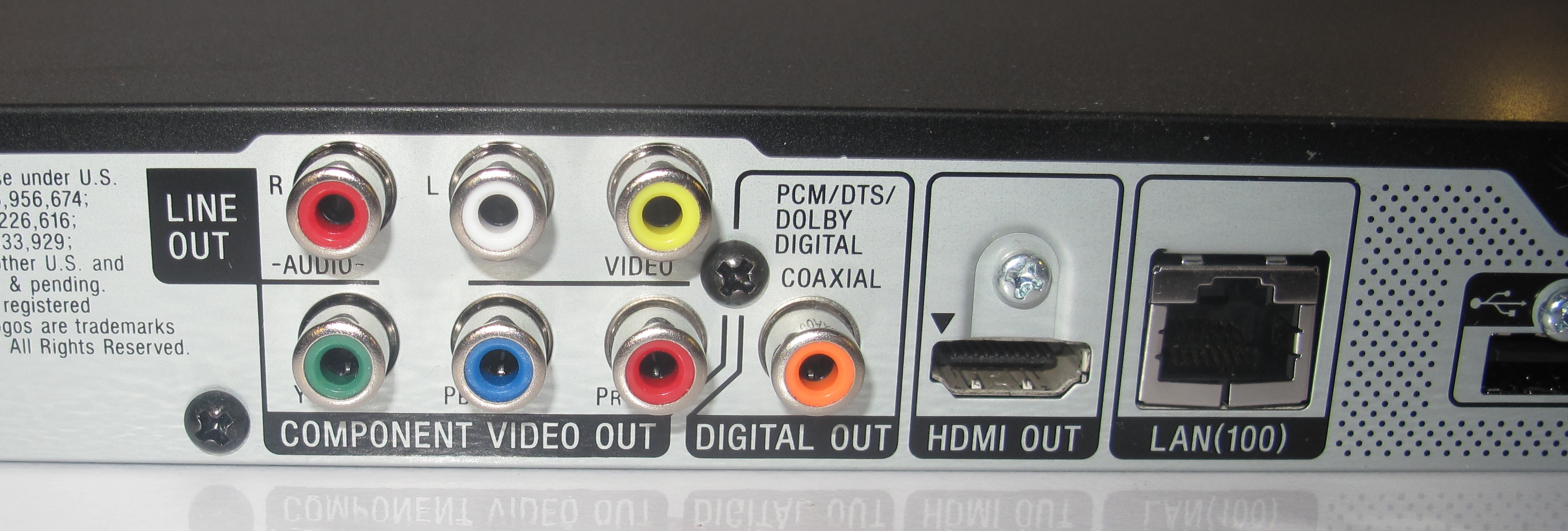
You can connect this Sony Blu-Ray player to a large range of older and newer video equipment. An example of this is the component video output being able to be set to yield RGB component video as well as YCC component video. This will please those of us who have European TVs that are equipped with a SCART connector or video projectors and monitors that have RGB video connectors. In the former case, the user will need to purchase a SCART-component-video cable and in the latter case, they will need to make sure the device accepts basic RGB video input through three RCA or BNC terminals.

Sony BDP-S380 Network Blu-Ray Player rear panel connections

Rear panel connections

Of course, the BDP-S380 can work with HDMI-enabled video equipment as a Blu-Ray player should and has the ability to connect to home-theatre receivers or digital preamplifiers via an SP/DIF coaxial RCA connector.

It can connect to the home network via Ethernet or Wi-Fi via an extra-cost USB dongle available from Sony. Personally, I would connect this player to the home network via an Ethernet or HomePlug AV connection in order to benefit from reliable performance, and have tested this player’s network ability with this connection setup.

General operation experience

Sony BDP-S380 Network Blu-Ray Player remote control

Remote control

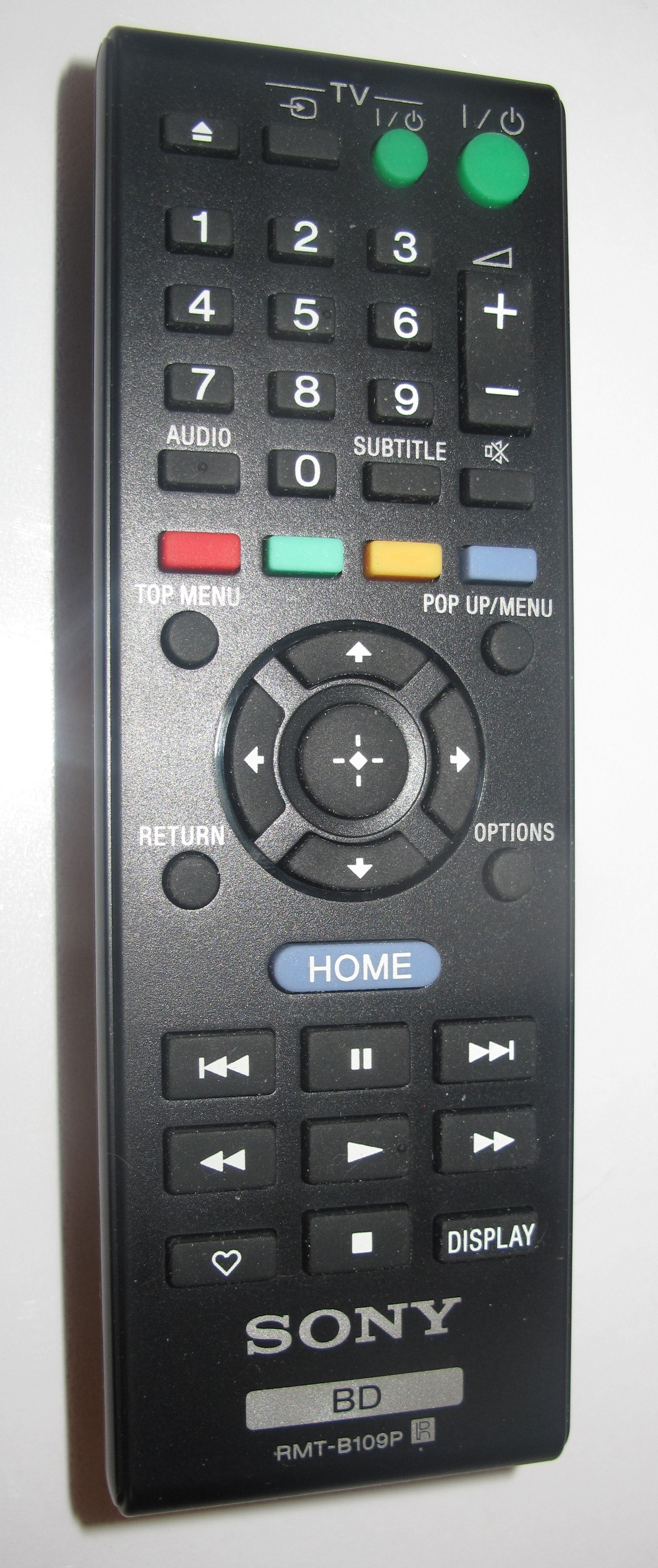
The BDP-S389 Blu-Ray player has a user experience similar to what happens with other Sony consumer audio-video equipment made over the last few years that uses the TV as its user interface. Examples of this include the PlayStation 3 and the STR-DA5500ES home theatre receiver which I reviewed previously.

This user interface, known as the “XrossBar” interface, has you moving between the main media types (Music, Pictures, Video) and the Setup and Network options using the “Left” and “Right” buttons on the device’s remote’s D-pad. Then you select the sptions like media collections and services or setup screens using the “Up” and “Down” buttons on that D-pad. When you are in this interface, you really know where you are because you still see some of the other top-level icons on the screen.

Local media playback

The Sony BDP-S380 is able to work properly as a fully-functional standard Blu-Ray player. This includes the ability to work with BonusView and BD-Live discs that require reusable local storage or network connectivity.

Of course, like nearly all DVD and Blu-Ray players that are on the market since the last few years, this unit need to be operated by their remote control.

It can play content held on USB Mass-Storage Devices, primarily memory keys and single-unit flash-card readers. The instructions mention that this player could work with USB hard disks but the player may not provide enough power to drive the bus-powered 2.5” hard disks by itself.

Here, the Sony has two USB ports for connection of these media devices. But the front port can be used for the optional Wi-Fi dongle or a USB keyboard. At the moment, this would come in handy when using the built-in YouTube or Qriocity services where you enter in user login details or search for media. The rear USB port is used for separate local storage if you are using BD-Live or BonusView discs.

There is a small display on the front that can come in handy for playback of audio CDs and SACDs without the need for the TV to be on.

Network Media

The Sony BDP-S380 can be used to connect to the local “catch-up TV” / video-on-demand services that are offered by most of the channels. For Australian viewers, this includes the ABC iView service, the SBS service and the Plus7 service.

You also have access to other Internet video libraries like the YouTube library, the Qriocity library, LiveStrong.com amongst many others. With some of the libraries, you have to log in to the libraries to gain proper functionality such as access to personalised content selections. There is an option to allow this player to regularly poll for new services that are delivered on the Bravia Internet Video platform, which you can do through the setup menus.

The login experience for services like Qriocity and YouTube is primarily “SMS-based” where you use the numeric keypad on the remote control to enter your login parameters. If you need to change character sets, you have to highlight a “ABC” / “123” option using the D-pad. There is the option to use a USB keyboard for improved login experience.

Like most of these devices, there isn’t any form of catering for the reality of multiple users sharing the one piece of equipment. Here, if you log out of the YouTube client for example, the software doesn’t cache your username – you have to enter these details fully.

Being an entry-level model, the Sony BDP-S380 loses some features. One of these, which I find critical for the networked home, is DLNA media playback. The Sony BDP-S480, which is the model above, has this feature along with Blu-Ray 3D playback as the two main differentiating features.

Limitations and Points Of Improvement

I would recommend that Sony provides the DLNA media playback feature across the whole component Blu-Ray player range for the next model run and provide extra DLNA features like MediaRenderer functionality for step-up and top-shelf models.

As well, I would like to see support for an improved multi-user “hot-seat” experience for this class of devices, such as retention of username and/or simplified PIN login options. It could also benefit from social communications features like Twitter / Facebook access and a Skype videoconferencing terminal in a similar vein to Sony’s BRAVIA TV sets.

Conclusion

I would recommend the Sony BDP-S380 Blu-Ray player as a good-quality Blu-Ray / basic Internet video solution for use with a cheaper or older TV set. This is more so for those of us who want to “cut our teeth” on Internet video by replacing a half-dead “Chinese-special” DVD player rather than replacing a TV set with many miles left in it. You also get a good-quality reliable optical disc player as well as an Internet-video terminal in the same package.

If you want more functionality with your home network, especially if you have lots of media on a network-attached storage device, I would prefer that you spend the extra AUD$30 and go for the Sony BDP-S480 rather than this model.

Blu-Ray players–they could give more life to older and cheaper TVs

Article

Smart TV – why are Blu-ray players second-class citizens?

My comments

I agree with the principal argument that this article had put forward concerning the availability of the “smart-TV functionality” in video peripherals like Blu-Ray players or network-media adaptors. There is due to a reality that most of the consumer-electronics industry has been missing concerning how people have purchased and owned TV sets; something I, like most of you, have seen for myself.

The reality with TV purchasing and ownership

Since the 1970s, the typical colour television set has been able to enjoy a very long and reliable service life, thanks to transistorisation. This had been underscored with the gradual introduction of electronic tuner subsystems that were more reliable than older mechanical tuner systems like the old “click-click-click” tuning knobs that were common in most markets or the “push to select, twist to tune” button arrays common on TV sets sold in the UK in the 1960s.

This long service life then allowed for a “push-down” upgrade path to exist in a similar manner to what happens with the household refrigerator. Here, one could buy a nicer newer fridge and place it in the kitchen while the older fridge that it was to replace could go in the garage or laundry and act as extra cold storage space for food and drink, such as the typical “beer fridge”. In the case of the TV, this would mean that one would buy a newer better TV, most likely with a larger screen and place it in the main lounge area. Then the original set which was to be replaced by the new set typically ended up in another room like a secondary lounge area or a bedroom or even in a holiday house.

Usually the only reason most households would scrap a TV set would be if it failed beyond repair or was damaged, Even if a set was surplus to one’s needs, it would be pushed off to another household that could benefit.

Some people may think that this practice has stopped with the arrival of the LCD or plasma flatscreen TV, but it still goes on.

Not all TVs are likely to be “smart TVs”

Not all manufacturers are likely to offer network-enabled TVs in their product cycle. This may be due to a focus on picture quality or the ability to build lower-end products to a popular price point.

It also includes sets like TV-DVD combo units or small-size models that are offered at bargain-basement prices. As well, home-theatre enthusiasts will be interested in buying the latest projector rather than the latest “smart TV”.

Addition of extra functionality to existing televisions with video peripheral devices

The consumer-electronics industry has had success with extending the useability of existing television receivers through the use of well-equipped multi-function video peripherals.

The video recorder as a TV-enablement device

The best example of a device enabling older and cheaper TV sets was the video cassette recorder as it evolved through the 1980s. This wasn’t just in the form of recording of TV shows and playback of content held on videocassettes.

It was in the form of improved television viewing due to the TV tuners integrated in these devices. By model-year 1981 in all markets, the typical video recorder was equipped with a reliable electronic TV tuner. As well, all VHS and Betamax video recorders that implemented logic-control tape transports also implemented a “source-monitor” function when the machine wasn’t playing tapes. This would typically have the currently-selected channel on the machine’s tuner available at the machine’s output jacks including the RF output channel that the TV was tuned to.

Here, this setup gave the old TVs a new lease of life by providing them with a highly-reliable TV signal from the VCR’s tuner. In some cases, users could tune to more broadcasts than what was available on the TV set. Examples of this included cable channels received on an older “non-cable” TV in the USA or Germany; channels broadcasting on the UHF band through a mid-70s VHF-only TV in Australia and New Zealand; or access to Channel 4 on a “4-button” TV in the UK due to more channel spaces.

The ability to change channels using the video recorder’s remote control also allowed a person who had a cheaper or older TV to change channels from the comfort of their armchair, something they couldn’t previously do with those sets.

Similarly, some households would run a connection from the video recorder’s AUDIO OUT to their hi-fi system’s amplifier and have TV sound through their better-sounding hi-fi speakers. This was exploited more with stereo video recorders, especially those units that had a stereo TV tuner integrated in them, a feature that gradually appeared as TV broadcasters started to transmit in stereo sound through the 80s and 90s.

How the Blu-Ray player is able to do this

The typical well-bred Blu-Ray Disc player has the ability to connect to the home network via Ethernet or, in some cases, Wi-Fi wireless. This is typically to support “BD-Live” functionality where a user can download and view extra content held on a Blu-Ray Disc’s publisher’s servers in addition to viewing content held on the disc. As well, the Blu-Ray Disc player can connect to ordinary TV sets as well as the HDMI-equipped flat-screen TVs that are currently in circulation.

Some of the Blu-Ray players, especially recent Samsung, Sony and LG models can also pull down media from the DLNA Home Media Network and show it on these TVs. As well, some manufacturers are rolling out some Internet-ended services to these players.

In the same way as the video recorder was able to extend the functionality of the cheaper or older TV set by offering extended tuner coverage, remote control or access to better sound, the Blu-Ray player or network media adaptor could open the world of Internet–ended entertainment to these sets.

What the industry should do

The industry could work towards achieving similar interactive functionality for the network-enabled video peripherals as the network-enabled TVs. They could achieve this through the establishment of a “platform design” with similar applications and capabilities across a consumer-video product lineup. It is infact what Sony is doing for their consumer-video products at the moment with very little difference in interactive-service lineup between their TVs and their Blu-Ray players.

Here, the interactive-TV software is consistent across the whole lineup of TVs, Blu-Ray players, Blu-Ray-equipped home-theatre systems and other video peripherals. The manufacturer may vary the software according to the device’s function by omitting functions relating to particular hardware requirements like screens, optical drives or broadcast tuners in order to make it relevant to the device class. Of course, there could be support for user-attached peripheral devices like USB Webcams, Bluetooth-enabled mobile phones, UPnP-compliant printers and the like to extend functionality for particular software applications like video-conferencing.

The software may be fully revised every few years to build in new functionality and accommodate better hardware. It may also be a chance to improve the operation experience for the software concerned. Yet this could maintain the branding and skinning that the manufacturer and software partners do desire.

Conclusion

There is a different reality that exists when buying TV equipment and this function should be supported equally in video peripheral equipment like Blu-Ray players and network media adaptors as in TV sets.

Consumer Electronics Show 2011–Part 2

The Android technology doesn’t stop at handsets or tablets anymore at this year’s CES.

In the car

Parrot are premiering the “Asteroid” which is an Android-powered car radio / multimedia player. It has USB for connectivity to iOS devices, USB flash memory, wireless-broadband modems and GPS pucks at the moment as well as line input for regular audio devices. I am not sure what Bluetooth or hands-free calling abilities it has at the moment but this could change by the time it is released. Of course it has FM radio and, through the 3G connectivity and an Android app, could support Internet radio in the car as well as being a media player and GPS navigation device. It has a power output of 55W x 4 but also has three preamplifier outputs (front, rear, subwoofer) so it can be the head unit for the most tricked-out sound system on the street. Oh yeah, boys!

Similarly, Fujitsu Ten are previewing an satellite-navigation unit which is powered by the Android operating system. The main issue with these Android systems at the moment is that the Google “Android Marketplace” doesn’t support them because they use an interface that is dissimilar to the handset or tablet devices. Here, Parrot or Fujitsu Ten will either have to contract with an Android app store to supply applications to these devices and this app store would have to support the user interfaces provided by automotive Android devices.

In other car-tech news, Ford have developed an AppLink system so that specific iOS apps can be operated from the car’s dashboard. As well, General Motors have developed an IOS link to their OnStar vehicle telematics system but the main problem with these systems is that they necessitate an extra app on the smartphone for each marque. This is compared to Terminal Mode which the European vehicle builders are implementing, which allows one piece of software on the smartphone for many different vehicles and suits the reality that most of us will drive different vehicle marques through our driving life and even have regular access to two or more different vehicles.

As well, GM are intending to implement the PowerMat wireless-charging system in the  American-market vehicles from model-year 2011 onwards. This allows devices with Powermat charging circuitry, whether integrated or as an add-on module to be charged or powered on a special mat wirelessly. I have wondered whether this announcement will then apply to GM nameplates other than Buick, Cadillac, Chevrolet or GMC or other markets.

Networked Home Entertainment

Video Entertainment and the Home Theatre

As far as video-based home entertainment goes, 3D video still rules the roost with every one of the major camera names from Japan with a 3D camera or camcorder in their model lineup. As well, every major TV brand that serves the US market is selling a 3D flatscreen TV in their model lineup. Most of the manufacturers are working on 3D viewing technologies that either don’t need glasses or can work with lightweight glasses. This also includes some manufacturers establishing design partnerships with glasses-frame designers to make attractive 3D-viewing glasses.

But there is a lot more action when it comes to network-enabled TVs and video peripherals This is again driven by the supply of  “over-the-top” Internet video services like Netflix and Hulu Plus. It is also being helped along by manufacturers building up “app platforms” which allow the user to download apps to the TV as if it was like one of the smartphones. It can capture the reality of interactive TV as well as use of common Internet services like Twitter, YouTube and Facebook from the comfort of your couch. As well, programs like Skype are being implemented on these TVs in order to make them become large-screen video-conferencing units for the home or small business.

LG have supplied the ST600 Smart TV kit, which is an add-on kit for selected (or all?) LG TVs to link them to the Internet and the DLNA Home Media Network. As well, one of their pico-projectors that they had on show is equipped with an digital-TV tuner and can stream content from a DLNA Media Server.

Sony now has it that all of their new Blu-Ray players are all DLNA and Gracenote enabled/ They all can quickly start a Blu-Ray movie and have support for the “Media Remote” RF link with Wi-Fi-enabled iOS or Android device running a specific app. These same features are also available to their Blu-Ray home theatre systems.

As well, most of the Sony BRAVIA TV range released this year will be network-enabled with DLNA, Internet TV, Skype large-screen videophone and similar functionality. Some models will have integral 802.11n Wi-Fi functionality while the lower-cost models will require a dongle to connect to the Wi-Fi network. This really shouldn’t worry most users because they could use direct Ethernet or HomePlug AV links to connect the TV to the home network.

The Skype videophone function will work with an optional USB webcam / microphone kit that will be available from Sony.

As well, most of the TVs and home-theatre systems honour the full HDMI 1.4 expectation with Audio Return Channel. This means that the sound from the TV’s integrated sources like the digital TV tuner travel back to the home theatre amplifier using the same HDMI cable used to connect the TV to that amplifier. There is no need to use extra digital cable runs to have properly-decoded surround sound from TV broadcasts received via the TV’s tuner.

As well, Sony has released a network-audio product that makes Apple squirm when it comes to their Airport Express and AirPlay subsystem. This product which comes in the form of the HomeShare speakers connects to a Wi-Fi home network and can play out audio content under the control of a UPnP AV (DLNA) Control Point like Windows 7 or TwonkyMedia Manager. This same control functionality is also available in Sony’s latest Blu-Ray Players as well as the NAS-SV20 and NAS-SV10i iPhone docks.

Samsung have come around with a Blu-Ray player that is the thinnest such player ever. This Wi-Fi-enabled player can be wall-mounted and, in my honest opinion, is cutting in on Bang & Olufsen’s “design AV” territory.

They also are releasing the D6000 TVs  which work with RVU compliant pay-TV gateways. This standard, which is a superset of DLNA for pay TV applications). enables access to the full pay-TV feature suite like pay-per-view or video-on-demand without the TV being connected to the pay-TV operator’s set-top box/ This concept has been proven to works with an RVU server box that links to DirecTV’s satellite pay-TV service.

Iomega have also released a Boxee TV set-top box which is similar to D-Link’s unit. But the similarity stops here because it has integrated NAS functionality with DLNA Media Server. It is capable of working with Ethernet wired or 802.11n Wi-Fi networks and uses a double-side remote with QWERTY keyboard. It is available as an enclosue or with a 1Tb or 2Tb hard disk.

Vizio, a low-cost TV brand in the US similar to Kogan, is to implement Via Plus (Google TV) in their Internet-enabled TVs. They will be providing apps that link to Hulu Plus, Blockbuster On Demand, and other popular “over-the-top” TV services. These sets will also have Skype functionality when used with a USB webcam. Vizio will also be implementing glasses-free 3DTV and are dabbling in 21:9 ultra-widescreen TV

Cisco have been focusing on the interactive TV front but in a different way. They sell  the Scientific Atlanta set-top boxes on contract to cable and satellite providers and are implementing an app platform on their newer boxes. This also means that they are providing a “VideoScape” content-selection experience so that users can find the content they are after or look for related content easily.

JVC have released the first “soundbar” speaker system which implements the HDMI 1.4 Audio Return Channel. Here, this technology comes in to its own with these speakers because the sound from the TV emerges through the easy-to-set-up soundbar unit.

Internet radios

Grace Digital have released three Internet radios that have a similar user interface to the Grundig TrioTouch stereo Internet radio or the Revo IKON stereo Internet radio. Here, these sets use as their primary user interface a colour LCD display with icons laid out in a grid not dissimilar to a smartphone or tablet. The Mondo is designed to be a full-on clock radio for the bedside and has a 3.5” display, Ethernet and line-out connectivity and a remote. The Solo Touch is a tuner that connects to one’s favourite music system and has a large 4/3” touchscreen. It connects to the home network via Ethernet. The Bravado X is a stereo table radio with line in / out and has a 2.7” display. These units can also be controllable via a smartphone app which is available for the iOS only at the moment.

As well, Vizio have jumped on the Android bandwagon by providing a stereo table radio which operates on the Android platform. This one is controlled by a colour LCD touchscreen like the typical smartphone. It would most likely would have an Internet-radio app and also pull in music from a DLNA Media Server device.

The next article in the series will focus on network-infrastructure technologies for the small network and what is being offered here.

HDTVs and a BD-Live Blu-Ray player driven by Google TV offered by Sony to the US

Articles

Sony Intros the Worlds First HDTV Powered by Google TV | eHomeUpgrade

Sony Internet TV & Sony Internet Blu-ray Player Revealed at NYC Event | Sony Insider

My comments

The new Sony TVs and Blu-Ray player have moved from a regular Sony firmware to a firmware based on the Google TV platform with access to the Android Market. This will provide the extensibility that Google TV can provide especially when new “over-the-top” or interactive TV services come on the Internet scene.

There is no mention of any DLNA support for integration with the DLNA Home Media Network devices; but an Android app pitched at Google TV devices could solve the problem.

At the moment, these sets are only available to US market with the market-specific features such as an ATSC tuner with CableCard support and the BD-Live Blu-Ray player only able to play DVD Region 1 and BD Region A discs. But it doesn’t take long for Sony to reconfigure their TV devices for the European, Asian or Australian / New-Zealand markets by adding features that are specific to these markets .

Technorati Tags: ,,,,,,,,,,,,,,,,,,,,,,,,,,,,,,,

New NETGEAR products for the home network

 NETGEAR Rolls Out HD Media Players, UTM and Powerline Products – SmallNetBuilder

My Comments

I have read the attached article and found that most of the devices had impressed me as devices that would work well in a home or small-business network. This was because of particular abilities that had made the devices unique rather than run-off-the-mill devices.

NeoTV network media players

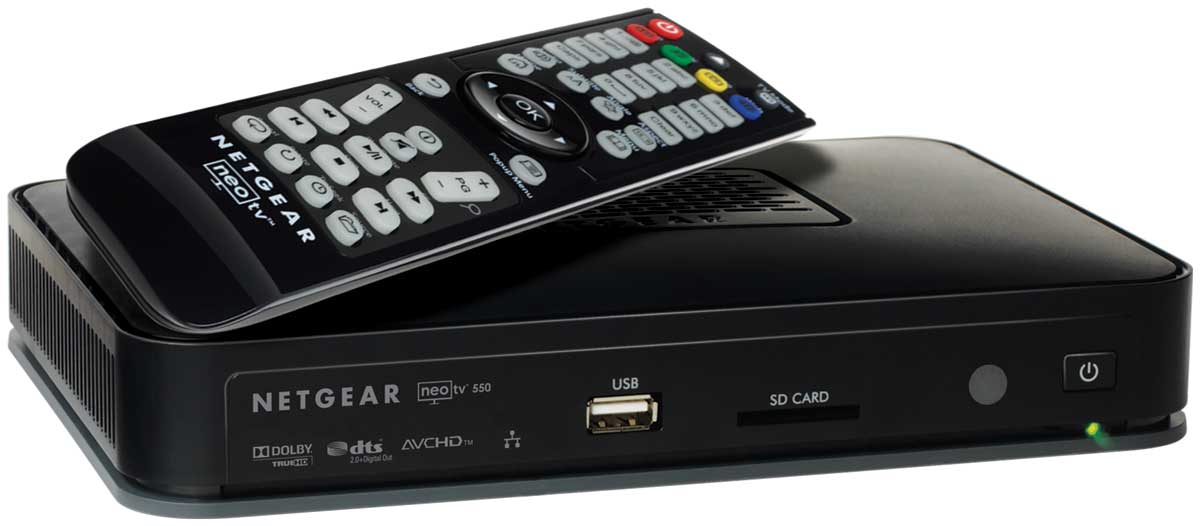
NETGEAR NeoTV 550 network media player

NeoTV 550 network media player

This group of NeoTV network media players may be very similar to the other network media players  like WDTV Live that are appearing on the market. This is that they are capable of playing audiovisual media held on a USB memory key, camera card reader or external hard drive; or from a DLNA/UPnP-AV-compliant media server that exists on your network. But one of the models in this lineup, the NeoTV 550,  has eSATA connectivity and the ability to be a Blu-Ray Disc player when connected to an optional eSATA-connected Blu-Ray drive. This can benefit people who want to consider running this unit alongside their DVD player as a network media player but may take the plunge for Blu-Ray when they are ready.

At the moment, I am not sure whether this unit can work as a substitute DVD player if it is connected to an eSATA or USB DVD drive or a DVD is loaded in to a connected Blu-Ray drive.

HomePlug AV 802.11n access point

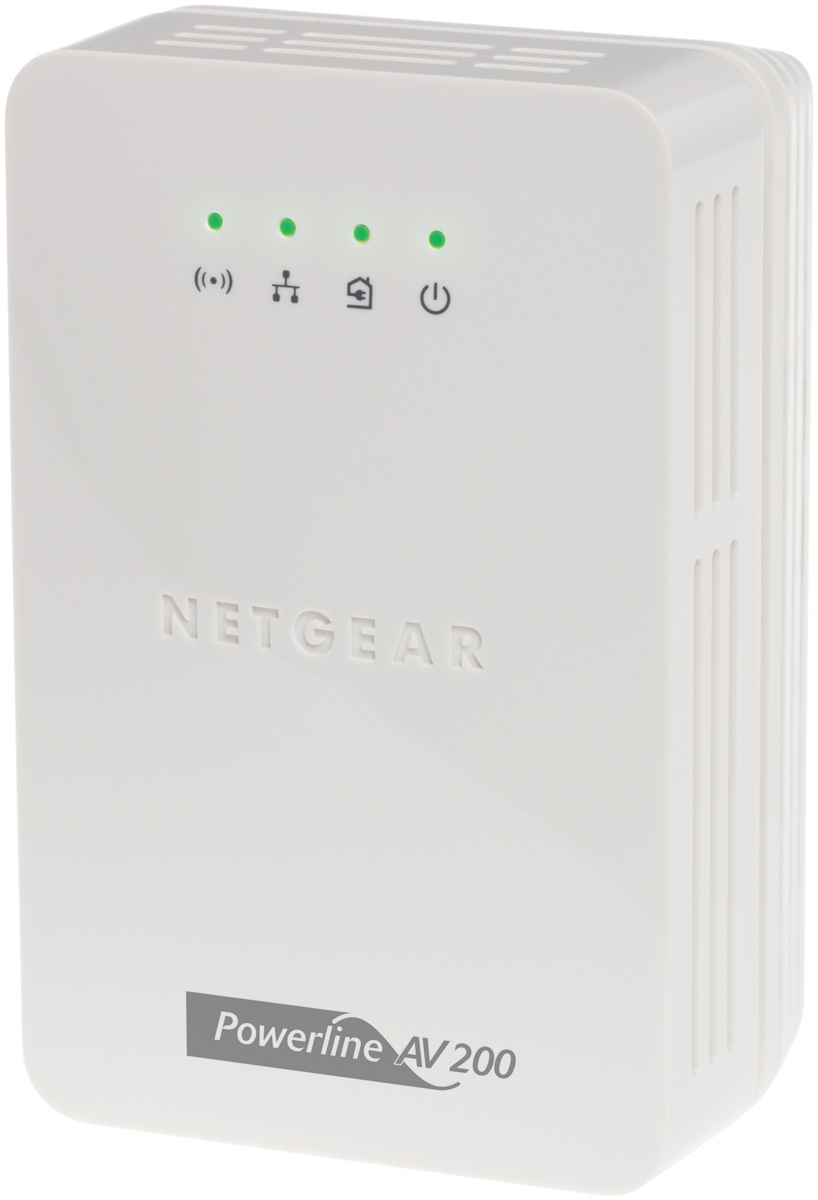
NETGEAR XAVN2001 HomePlug AV 802.11n wireless access point

XAVN2001 HomePlug AV 802.11n wireless access point

One device I am pleased to see on the scene is the XAVN2001 HomePlug AV 802.11n wireless access point which work like some of the 802.11g wireless access points that can connect to a HomePlug 1.0 Turbo segment. It is also available as part of the XAVNB2001 kit which includes the Netgear XAV2001 HomePlug AV-Ethernet bridge as well as this access point. Like these other access points, this unit plugs in to the wall and works as a bridge between an Ethernet segment and a HomePlug AV powerline segment as well as being an access point for a 2.4GHz 802.11n wireless network.

This device can work as a way of extending the effective radio footprint of an 802.11n wireless network with the use of an Ethernet or HomePlug AV wired backbone. On the other hand, it could bring an 802.11n wireless network and Ethernet network point in to an outbuilding or static caravan (trailer) in the manner talked about in my feature article “Multi-Building Home Networks”.

Quick extension-access-point setup with WPS

I had done further research about this access point through Netgear’s Web site and found that this unit uses WPS as a way of simplifying the creation of a multiple-access-point wireless-network segment. This kind of segment, also known as an “extended service set” makes use of multiple access points with the same SSID, network operating mode and security parameters so a portable device can move between access points with minimal user intervention. I have written a bit about the concept of using WPS as a way of simplifying setup of a small multi-access-point wireless network in an article I had posted last year on this site at its old location and had moved to the current location.

The user just has to hold down the unit’s ON-OFF button for a few seconds then press the WPS button on the WPS-ready wireless “edge” router to start the configuration routine. A few moments later, they are then able to move the access point to the area where the Wi-Fi network is needed and proceed to connect this access point to the Ethernet or HomePlug AV backbone which the wireless router should be connected to.

Conclusion

If more manufacturers can look towards making affordable and easy-to-use network devices, they can end up with equipment that will appeal to most users and have equipment that is out of the ordinary.